8 Best Wedding Photo Sharing Apps for Every Style (2026)
The real problem with picking a wedding photo sharing app isn't that there are too few options. It's that every "best of" list ranks the same handful of apps by features or price, and that never quite answers the question couples are actually asking. Which one is right for my wedding?
Choosing the best wedding photo sharing app means you need to know which ones drive customer demand and are popular for couples and wedding organizers. Second, the photo sharing service must have excellent use cases where even the slightest inconvenience is well covered and thought of, ensuring the wedding is seamless and memorable.
Third, pricing transparency. We can’t stress this further, as many couples plan with a budget in mind. Fourth, an app-free guest experience as a default expectation, not a feature you have to keep announcing throughout the wedding.
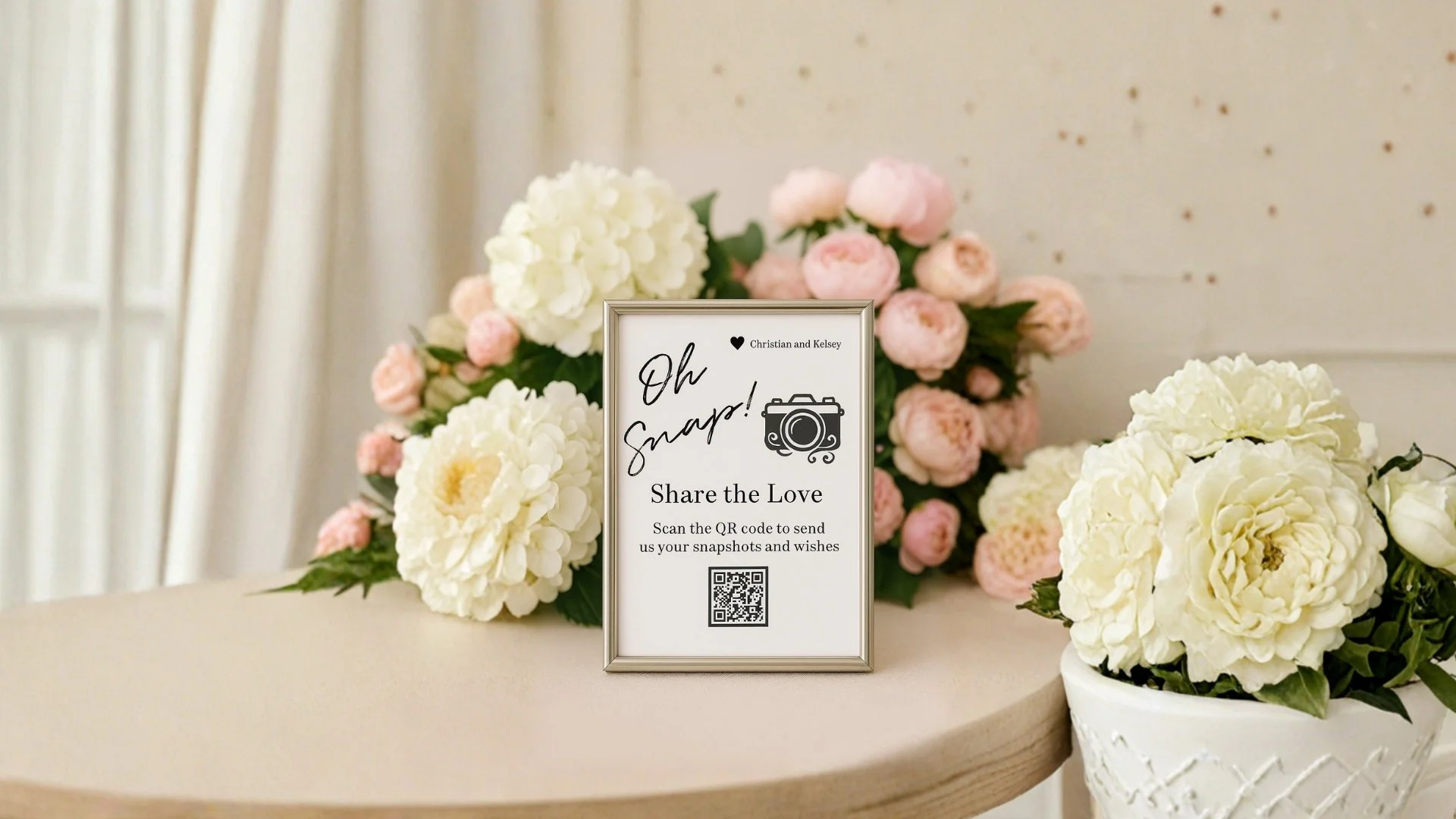
1. Dearest Events: Best for Premium and Curated Aesthetic
Best for: Couples investing in a cohesive premium wedding aesthetic, where the photo sharing experience needs to match the quality of the stationery, signage, and overall visual feel of the day.
What sets it apart: Dearest Events is built around collection-based packages instead of a generic photo dump. The Signature Celebration Collection covers weddings, milestones, and showers. The Corporate Moments Collection handles company events. The Tribute & Remembrance Collection is for memorials.
The product is designed around the moments couples actually want preserved, not around file storage as a feature. Guests scan a QR code and upload from any phone, with no app, no account, and nothing to log into. Every photo, video, and message lands together in one private gallery.
Couples get gallery access starting at twelve months. You can also get heirloom-quality photo book printing with a $39 proof fee credited toward the final book.
For couples looking to seamlessly incorporate QR Code photo sharing in the full wedding experience, browse the Dearest Events packages to see all your options.
2. GuestPix: Best for Budget Couples
Best for: Couples who want a clean, dependable photo collector without overpaying or navigating tier upgrades to unlock the basics.
What sets it apart: The lowest verified base price in the category right now: $49 (verified May 2026) for the standard event package, with unlimited uploads and a zero-app guest experience. GuestPix does the core job (collect guest photos through a QR code into a private gallery) at a price that doesn't require a budget conversation with a partner.
Trade-off: Manual moderation only, fewer creative output options than higher-tier players, and the experience feels more functional than designed. If aesthetic-first matters, look elsewhere on this list. For a closer comparison, see how GuestPix compares to alternatives.
3. Wedibox: Best All-in-One (Photos + Audio + Website)
Best for: Couples who want their photo sharing app, audio guestbook, and a basic wedding website in a single tool. Couples who would rather consolidate vendors than hunt for best-in-class in each category.
What sets it apart: Wedibox bundles the QR photo collector with audio messages (guests leave voicemails through the same QR flow), plus a shared playlist for song requests and a basic wedding website builder. Base packages start at $59 (verified May 2026). For couples who want a one-stop solution, the convenience case is real.
Trade-off: Many headline features sit behind paid tiers, so the $59 base does not include everything the marketing pages show. Read the tier breakdown carefully before checkout. For an honest comparison from the alternative side, see Wedibox versus other alternatives.
4. Fotify: Best for AI-Powered Moderation
Best for: Larger weddings (100+ guests) where someone needs to filter blurry, duplicate, or unflattering uploads automatically. Couples who do not want to spend their first married week sorting through 1,500 photos by hand.
What sets it apart: AI auto-filtering on uploads. Fotify quietly removes obvious duplicates and low-quality images as guests upload them, which spares the couple the manual moderation work that adds up fast at scale. For weddings where the guest list is large enough that the gallery becomes its own post-wedding project, this is a meaningful unlock.
Trade-off: AI filtering occasionally over-flags, so a quirky shot you actually loved can get caught in the net. Pricing tiers scale with guest count too, which means larger weddings pay more. Verify the tier that fits your guest count against the current pricing page, because the brackets shift.
5. POV (or Guest.Gallery): Best for App-Free Simplicity
Best for: Tech-shy guest lists, older relatives, destination weddings with patchy data, and anywhere the words "no download required" matter more than feature depth.
What sets it apart: A pure QR-to-browser flow, end to end. No account creation, no app prompts, no friction at all. Guests scan, upload, done.
POV (and similar tools like Guest.Gallery) lean fully into the simplicity case here. For weddings where the guest list skews older or international, that simplicity itself is the feature.
Trade-off: The feature set is intentionally light here. There's no curation layer, no real branding controls beyond the basics, and no slideshow or photo book output. For couples who want the upload experience to feel like part of their wedding's design, this slot is too plain.
6. Kululu: Best for Multi-Day Wedding Weekends
Best for: Weddings with a rehearsal dinner on Friday, ceremony and reception on Saturday, and a brunch on Sunday. Couples who want separate-but-connected galleries for each event under one wedding.
What sets it apart: Multi-event support is the core feature here. Most photo sharing apps treat the wedding as one event with one QR code, full stop. Kululu lets a couple set up distinct galleries for each event in the weekend, then view them all as one cohesive collection afterward.
For destination weddings and weekend-long celebrations, this is the structure that actually fits the day.
Trade-off: Pricing reflects the multi-event scope, predictably. For a single-event wedding with one QR code at the welcome table, Kululu is overkill, and a simpler tool is the cleaner pick. Verify pricing tiers against the current vendor page before committing to anything.
8. Memorykpr: Best for Non-Wedding Events
Best for: Engagement parties, bridal showers, corporate milestones, memorials, and other meaningful events that are not weddings but want the same photo collection experience.
What sets it apart: Event-agnostic positioning. Memorykpr is built to handle the broader category of milestone events without the wedding-first framing that shapes most apps in this space. For families organizing a celebration of life, or couples planning an engagement party with the same care they'll put into the wedding itself, that broader scope really helps.
Trade-off: The wedding-specific polish you get from the category leaders is lighter here. For couples who want a wedding-first experience, the picks above will fit better.
Worth noting too: Dearest Events also offers non-wedding collections. The Corporate Moments Collection and Tribute & Remembrance Collection cover corporate events and memorials with the same elegant approach the Signature Celebration Collection brings to weddings. If a couple already uses Dearest for the wedding, the engagement party can simply stay in the same ecosystem.
How to Pick the Right One for Your Wedding
If the list above is too much to triage right now, the four decision rules below cover most couples.
Pick by budget. If keeping the spend tight is the priority, GuestPix at $49 is the cleanest base option. Wedibox at $59 fits if the audio guestbook and basic website matter enough to justify the bundle.
Pick by aesthetic. If the wedding's design sensibility is the throughline (calligraphy signage, custom typography, intentional palette), Dearest Events earns this slot. The collection-based approach matches the way couples are already planning the rest of the day.
Pick by guest tech comfort. If the guest list skews older, international, or on-the-fence about technology, app-free simplicity (POV / Guest.Gallery) wins. The simpler the upload flow, the higher the participation rate.
Pick by event scope. One day, one QR code? Most picks above work fine. Three days, four events, multiple venues? Kululu's multi-event structure is built for that. Photographer-led wedding? We got you covered.
One last lens to mention. If you've genuinely got a tie between two picks, default to the app whose CTA doesn't feel like a sales pitch. Wedding planning has enough of those already.
Frequently Asked Questions
What is the best wedding photo sharing app overall?
Honest answer: there isn't one. The right app depends on the wedding's style, budget, and guest list. A premium-aesthetic wedding finds its fit at Dearest Events. A budget-conscious wedding lands at GuestPix. A multi-day weekend points toward Kululu. The "How to Pick" section above maps the four decision rules.
Do guests need to download an app to use these?
Most of the picks above use a QR-to-browser flow that requires no app and no account at all. Guests just scan with their phone camera and upload through the browser. Dearest Events, GuestPix, POV, and Guest.Gallery all run app-free.
A few platforms still encourage app downloads for the full feature set, so verify on each vendor's pricing page before committing. For the format itself, see how QR code wedding photos work.
Prefer a step-by-step setup for any event? Read how to share photos with a QR code.
How much should a wedding photo sharing app cost in 2026?
Expect a range from roughly $49 to $200+ depending on tier and event scope. Base packages usually include the QR code, unlimited guest uploads, and a private gallery for several months. Premium tiers add curation features, longer access windows, branded signage, photo book printing, and multi-event support on top.
Verify the current price against each vendor's pricing page, because honestly, the brackets shift more often than they should.
What happens to the photos after the wedding?
Storage windows differ by vendor. Most quality apps offer at least six months of gallery access. Dearest Events keeps galleries open for twelve. Full-resolution downloads are usually included so the couple can pull the original files for printing or archiving.
Some platforms charge for extended access beyond the standard window. Check each vendor's policy before that storage timer starts running.
Which app is best for a destination wedding?
Prioritize app-free, browser-only flows for places where data signal might be thin. POV and GuestPix both fit that brief. Dearest Events also travels well, because couples wanting a premium experience that holds up across venues, cultures, and patchy connections often find the Signature Celebration Collection holds together better than budget options when the wedding is far from home.
Find the Service That Fits Your Wedding
The best wedding photo sharing app isn't the one with the most features or the lowest price. It's the one that fits the kind of wedding you're actually throwing, including the aesthetic, the guest list, the scope, and the way you want the day remembered.
If your wedding's design sensibility runs toward curated and considered, and you want the photo sharing experience to match the rest of how you have planned the day, browse the Dearest Events packages to see how each collection fits a different kind of celebration.